

Latest Version
Gabriele Musco
Internet
Linux
Free
org.gabmus.whatip
Report a Problem
More About What IP
While many network tools require memorizing complex terminal commands, the What IP network utility for Linux offers a refreshing, visually intuitive alternative. Developed by Gabriele Musco, this elegant open-source application consolidates essential networking diagnostics into a clean, single-screen interface. Instead of digging through configuration files or running verbose shell scripts, Linux users can now monitor their local and external network status with a single glance.
Why the What IP Network Utility Stands Out for Linux Users
The primary appeal of the What IP network utility lies in its simplicity. It bridges the gap between advanced command-line diagnostics and user-friendly desktop design. Whether you are troubleshooting a home server, configuring a smart home setup, or verifying your privacy shielding, this tool delivers immediate, actionable data without the fluff.
Core Features and Network Diagnostics
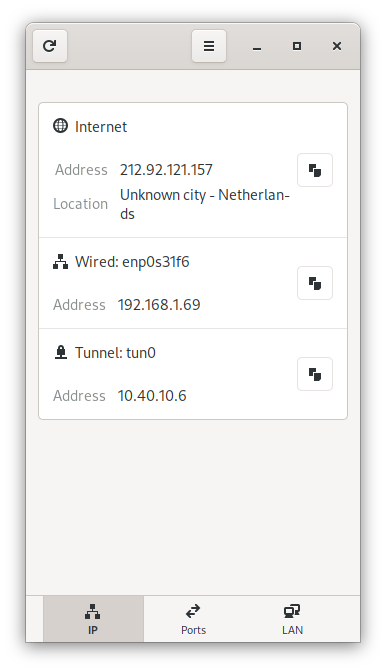
- Instant IP Identification: Instantly view your local, public, and virtual interface addresses. Copying any address to your clipboard takes just a single click.
- VPN Connectivity Verification: Secure your online presence. The application displays your location based on your current IP address, letting you verify at a glance if your VPN tunnel is active and routing traffic correctly.
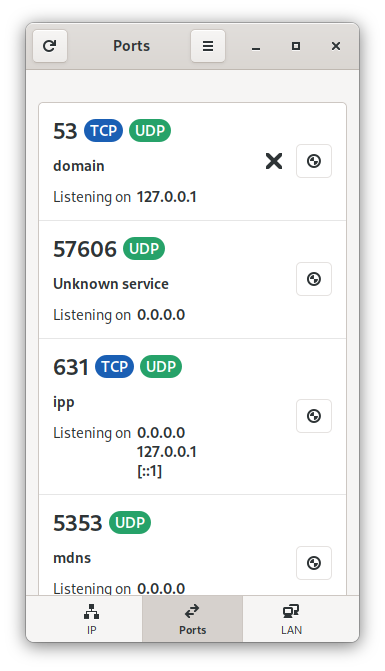
- Integrated Port Testing: Check system security and accessibility. The app lists all listening ports on your local system and tests whether they are publicly reachable from the outside world.
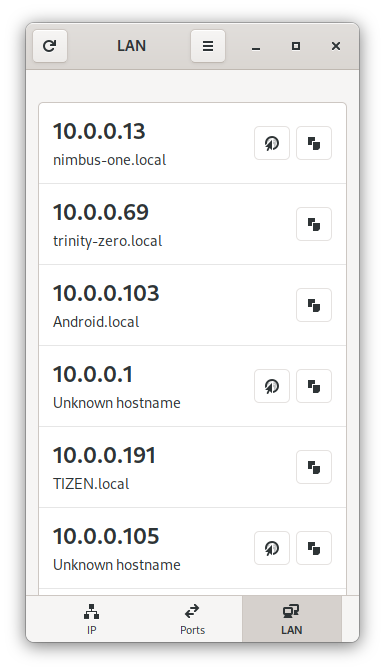
- Local Area Network (LAN) Discovery: Scan your entire local network. The utility automatically detects and lists all connected devices on your LAN, making it simple to find and copy their IP addresses.
Who Is This Network Tool For?
The What IP network utility is an ideal companion for self-hosters, privacy advocates, and everyday Linux users. If you frequently set up containers, manage home media servers, or need to verify your external routing while traveling, having these four core tools packaged into a lightweight GUI saves valuable time. It eliminates the need to jump between browser-based IP checkers, terminal port scanners, and local ARP tables.
Getting Started with What IP
For Linux users seeking a streamlined way to manage their network footprint, this utility is a stellar addition to any desktop environment. To explore this application further, view screenshots, or install it on your system, head over to the official What IP page on Flathub.
Rate the App
User Reviews













Popular Apps










Editor's Choice